

Updated October 2026
If you want one WiFi 7 router and no second guessing, get the ASUS RT-BE96U: tri-band, dual 10G ports, security that stays free for the life of the router. On a normal budget, the TP-Link Archer BE550 is the value pick reviewers and owners keep naming, as long as you read the US regulatory note in its section first. Short on money or in a small apartment, the ASUS RT-BE58U covers the basics for the least cash. And if nothing you own supports WiFi 7 or even WiFi 6E yet, wait: a new router cannot give old devices bands they do not have.
We did not bench test these routers. We compared manufacturer specifications, the patterns in owner communities like r/HomeNetworking, and the consensus of published reviews. Prices are bands checked in October 2026; coverage figures are the manufacturers’ own claims, labelled as such.
Top picks at a glance

ASUS RT-BE96U
Most people who can spend
$450 to $630
See the review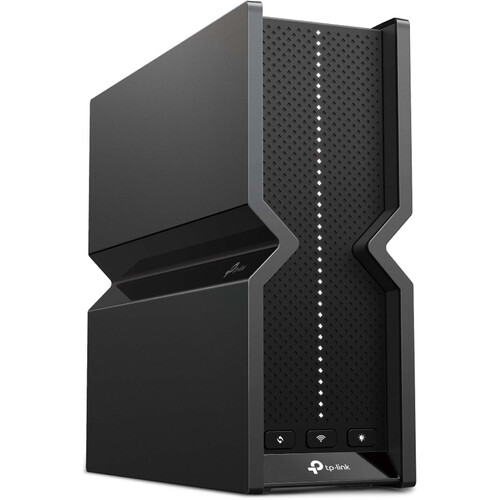
TP-Link Archer BE550
Value tri-band
$150 to $250
See the review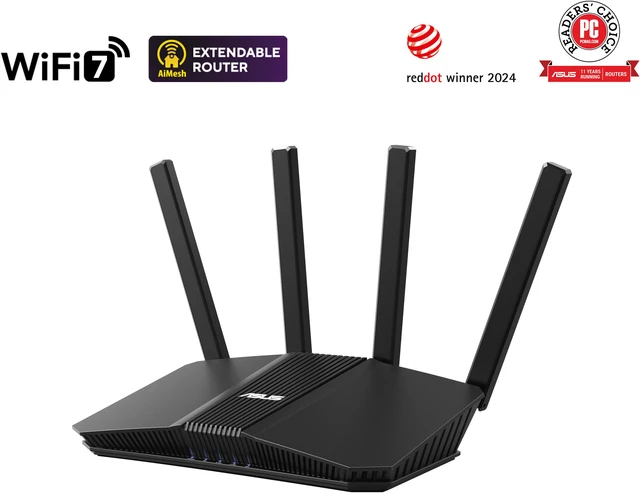
ASUS RT-BE58U
Tight budgets, apartments
$120 to $150
See the review
NETGEAR Orbi 770
Large homes
$600 to $700
See the review
ASUS ROG Rapture GT-BE98 Pro
Gaming
$590 to $700
See the review
Amazon eero Max 7
Big, busy households
$420 to $600 per unit
See the reviewQuick picks
| Router | Best for | Price band | Why it made the list |
|---|---|---|---|
| ASUS RT-BE96U | Most people who can spend | $450 to $630 | Tri-band flagship, dual 10G ports, subscription-free security |
| TP-Link Archer BE550 | Value tri-band | $150 to $250 | The most repeated budget recommendation anywhere; read the US note first |
| ASUS RT-BE58U | Tight budgets, apartments | $120 to $150 | Cheapest honest way into WiFi 7, free security included |
| NETGEAR Orbi 770 (3-pack) | Large homes | $600 to $700 | Mesh up to 8,000 sq ft (Netgear claim), dedicated backhaul |
| ASUS ROG Rapture GT-BE98 Pro | Gaming | $590 to $700 | Quad-band flagship, game acceleration, dual 10G ports |
| Amazon eero Max 7 | Big, busy households | $420 to $600 per unit | Hundreds of devices, simplest app in the business |
Do you actually need WiFi 7 in 2026?
WiFi 7 is a headroom upgrade, not a rescue. You feel it when several WiFi 7 devices are active at once, when your plan is faster than a gigabit, or when an old WiFi 5 router struggles under load. The features doing the work are Multi-Link Operation (MLO), which lets a device use more than one band at once, and 320 MHz channels on 6 GHz, double WiFi 6E’s widest channel.
Skip it if every device you own is WiFi 6 or older and coverage is fine, if your plan is under about 500 Mbps, or if your problem is one dead room; that needs placement or mesh, not a faster standard. One 2026 wrinkle runs through this list: since March 2026, new foreign-made routers need a US government Conditional Approval before sale here. ASUS, NETGEAR and eero hold approvals; TP-Link does not yet. Details sit in the BE550 section.
1. ASUS RT-BE96U: best overall
The RT-BE96U is the router r/HomeNetworking points to when the budget allows it, and review roundups agree. It is a BE19000 tri-band design with 4×4 streams on every band, up to 11,529 Mbps on 6 GHz by ASUS’s figures, dual 10G ports for multi-gig fiber or a fast NAS, and AiMesh support if you later grow it into a mesh. The quiet advantage is AiProtection Pro: commercial-grade security and parental controls included for the life of the router, no subscription, while rivals increasingly charge yearly.
The FCC granted ASUS Conditional Approval covering its router families through March 6, 2028, so it sits on the cleared side of the 2026 rule. The costs are literal: list price is $629.99, the box is large, and street prices in October 2026 sat around $440 to $480 in the listings we checked.
Key facts
- Price band: $450 to $630 (list $629.99; street prices near the bottom in October 2026)
- Class and bands: BE19000, tri-band (2.4 GHz, 5 GHz, 6 GHz), 320 MHz channels, MLO
- Ports: two 10G, four gigabit LAN, USB 3.2 and USB 2.0
- Security and warranty: AiProtection Pro included, no subscription; 3-year warranty per the Amazon listing
Pros
- Full WiFi 7 feature set with dual 10G ports for multi-gig plans
- Security and parental controls stay free for the life of the router
- AiMesh lets it become the base of a mesh later instead of a dead end
Cons
- Expensive at list price, and physically big
- Gigabit LAN ports feel stingy next to the dual 10G ports
2. TP-Link Archer BE550: best value tri-band, with a note you must read
On hardware for the money, nothing here argues with the BE550. It is a BE9300 tri-band router (5,760 Mbps on 6 GHz, 2,880 Mbps on 5 GHz, 574 Mbps on 2.4 GHz by TP-Link’s figures) with five 2.5G ports, where rivals at this price give you one fast port or none. It launched at $299.99; street prices through October 2026 ran from about $150 on promotion to about $236. CNET named it a 2026 Editors’ Choice, RTINGS calls it the mid-range pick, and owner threads repeat the verdict: the cheapest real WiFi 7 upgrade from a major brand.
Now the note. In March 2026 the FCC put foreign-made consumer routers on its Covered List, so new models need a Conditional Approval before sale. ASUS, NETGEAR and eero have theirs; TP-Link, as of October 2026, does not, and its application is under review. Routers already authorized, including this one, remain legal to buy and use, and keep receiving security updates under an FCC waiver. The harder half: five US states sued TP-Link in 2026 over alleged deceptive security and privacy claims, which it denies, saying it is an independent US company headquartered in Irvine, California, with devices made in Vietnam. None of that makes the BE550 bad hardware, but its long-term software future is less certain than the ASUS and NETGEAR picks, and advanced HomeShield features need a paid plan. Buy it with open eyes; it is still the value story of WiFi 7. (Tinkerers in the same threads often land on the GL.iNet Flint 3: tri-band BE9300, five 2.5G ports, OpenWrt-based firmware, around $190 on Amazon US.)
Key facts
- Price band: $150 to $250 (launched at $299.99)
- Class and bands: BE9300, tri-band (2.4 GHz, 5 GHz, 6 GHz), 320 MHz channels, MLO
- Ports: one 2.5G WAN, four 2.5G LAN, USB
- Coverage: up to 2,000 sq ft (TP-Link claim); EasyMesh support
Pros
- True tri-band WiFi 7 with 6 GHz at the lowest price from a major brand
- Five 2.5G ports, unmatched at this price
- The consensus value pick across reviewers and owner threads
Cons
- Long-term US software support carries uncertainty the other picks do not
- Advanced security and parental controls sit behind a paid HomeShield plan
- Range is mid-tier; large homes will want mesh instead
3. ASUS RT-BE58U: best budget pick
The RT-BE58U is the cheapest router here that still behaves like a real upgrade: a BE3600 dual-band WiFi 7 router, up to 3,600 Mbps combined, with MLO across its two bands, one 2.5G port for a faster plan, four gigabit ports, AiMesh support, and the same free AiProtection security as its bigger sibling. ASUS lists it at $149.99; Amazon US showed it around $120 to $150 in October 2026. For an apartment or small house replacing a tired WiFi 5 box, it is the sensible floor.
Be clear about the trade: there is no 6 GHz band, so no 320 MHz channels and none of the clean spectrum that makes WiFi 7 feel special with newer phones and laptops. You still get WiFi 7 efficiency, 4K-QAM on 5 GHz, ASUS firmware and free security, which is why budget roundups keep picking it over no-name rivals. If you own 6 GHz devices, stretch to the BE550 or BE96U instead.
Key facts
- Price band: $120 to $150 (list $149.99 at ASUS’s store)
- Class and bands: BE3600, dual-band (2.4 GHz, 5 GHz), 160 MHz channels, MLO
- Ports: one 2.5G port, four gigabit ports, USB
- Coverage and security: up to 2,000 sq ft (ASUS claim); AiProtection included, no subscription
Pros
- Lowest honest entry price into WiFi 7 from a major brand
- Free lifetime security and an AiMesh expansion path
- Small, simple and easy to live with
Cons
- No 6 GHz band, so less future headroom
- One 2.5G port only; everything else is gigabit
4. NETGEAR Orbi 770: best for large homes
When the problem is square footage rather than speed, a three-pack mesh kit beats any single box. The Orbi 770 (RBE773) spreads a tri-band BE11000 network, up to 11 Gbps combined by NETGEAR’s figures, across a router and two satellites rated for up to 8,000 sq ft and up to 100 devices. A dedicated backhaul keeps the satellites from eating bandwidth your devices need, and 2.5G ports throughout mean a multi-gig plan is not wasted. Community threads cross-shopping this class land on the same shortlist of Deco, eero and Orbi; the 770 is the pick for coverage first.
NETGEAR holds FCC Conditional Approval for its Nighthawk and Orbi families through October 1, 2027, so the 2026 rule is not a worry here. The real costs are money and the upsell: list price is $699.99, Amazon deals ran around $600 to $630 in October 2026, and Armor security becomes a paid subscription after its trial. Owner reviews grumble about the app more than the hardware.
Key facts
- Price band: $600 to $700 for the 3-pack (list $699.99)
- Class and bands: BE11000, tri-band mesh (2.4 GHz, 5 GHz, 6 GHz), dedicated backhaul
- Coverage: up to 8,000 sq ft, up to 100 devices (NETGEAR claims)
- Ports and warranty: 2.5G ports across router and satellites; 1-year limited warranty per the Amazon listing
Pros
- Genuine whole-home coverage for large or multi-storey houses
- Dedicated backhaul keeps satellite speeds up under load
- 2.5G ports throughout, ready for multi-gig plans
Cons
- Armor security becomes a subscription after the trial
- App gets mixed owner reviews; the kit is pricey next to a single router
5. ASUS ROG Rapture GT-BE98 Pro: best for gaming
Competitive players care about latency that stays flat when the house is busy, and wired ports that never become the bottleneck. The GT-BE98 Pro is the flagship built for exactly that: a quad-band BE30000 router with two separate 6 GHz bands, dual 10G ports, four 2.5G ports and Triple-Level Game Acceleration, which prioritises game traffic from the gaming port through to the server. In independent latency comparisons it held the lowest ping under simultaneous load, the result that matters at 11 pm when someone else starts a 4K stream.
The caveats are size, price and necessity. List price is $699.99; Amazon US showed $684.99 on October 26, 2026, with deals near $588 earlier in the month. The antenna array needs real shelf space, and the second 6 GHz band only pays off with the devices and multi-gig plan to feed it. A solo player in a small apartment gets the same in-game ping from the BE550 or BE96U for far less.
Key facts
- Price band: $590 to $700 (list $699.99)
- Class and bands: BE30000, quad-band (2.4 GHz, 5 GHz, dual 6 GHz), 320 MHz channels, MLO
- Ports: two 10G, four 2.5G, USB
- Gaming: Triple-Level Game Acceleration, dedicated gaming port; AiProtection included, no subscription
Pros
- Lowest latency under load in independent comparisons
- Dual 6 GHz bands plus dual 10G ports is unmatched headroom
- Game acceleration and free security, no subscription
Cons
- Flagship price and a very large footprint
- Overkill without WiFi 7 devices and a multi-gig plan
6. Amazon eero Max 7: best for big, busy households
Some households do not want a network project; they want WiFi that absorbs whatever the family throws at it. That is the eero Max 7. Each unit is a tri-band WiFi 7 mesh node with two 10G and two 2.5G ports, rated by eero for up to 2,500 sq ft and more than 200 connected devices; Amazon’s listings rate a 3-pack at up to 7,500 sq ft and 750+ devices. It doubles as a smart home hub (Thread, Matter, Zigbee), setup runs through an app anyone can use, and eero holds FCC Conditional Approval through October 31, 2027. Device capacity is the headline, not raw speed: eero quotes up to 4.3 Gbps wireless and 9.4 Gbps wired rather than a BE class number.
The trade-offs are control and recurring cost. There is no web interface and few advanced settings, which power users in r/HomeNetworking regularly cite as their reason for choosing ASUS instead. Advanced security features need the eero Plus subscription. And the price is serious: $599.99 list for one unit, sale prices near $420 during Amazon events in October 2026. Buy it for capacity and calm, not for tinkering.
Key facts
- Price band: $420 to $600 for a single unit (list $599.99); packs cost more
- Class and bands: tri-band WiFi 7 (eero quotes 4.3 Gbps wireless, 9.4 Gbps wired, instead of a BE class)
- Ports per unit: two 10G, two 2.5G
- Coverage and capacity: up to 2,500 sq ft and 200+ devices per unit (eero claims); 3-year limited warranty
Pros
- Highest device capacity here, built for smart-home-heavy houses
- Simplest setup and app in the category
- 10G ports on every unit, rare in mesh kits
Cons
- No web interface and few advanced controls
- eero Plus subscription needed for advanced security features
All 6 routers compared
| Router | Class | Bands | Fastest ports | Coverage (maker claim) |
|---|---|---|---|---|
| ASUS RT-BE96U | BE19000 | Tri-band | 2x 10G | Very large homes (ASUS rating) |
| TP-Link Archer BE550 | BE9300 | Tri-band | 5x 2.5G | Up to 2,000 sq ft |
| ASUS RT-BE58U | BE3600 | Dual-band | 1x 2.5G | Up to 2,000 sq ft |
| NETGEAR Orbi 770 (3-pack) | BE11000 | Tri-band mesh | 2.5G throughout | Up to 8,000 sq ft |
| ASUS ROG Rapture GT-BE98 Pro | BE30000 | Quad-band | 2x 10G, 4x 2.5G | Very large homes (ASUS rating) |
| Amazon eero Max 7 | No BE label (4.3 Gbps wireless claim) | Tri-band mesh | 2x 10G + 2x 2.5G per unit | Up to 2,500 sq ft per unit |
WiFi 6 vs WiFi 6E vs WiFi 7: what actually changes?
| WiFi 6 | WiFi 6E | WiFi 7 | |
|---|---|---|---|
| Bands | 2.4 GHz, 5 GHz | Adds 6 GHz | 2.4 GHz, 5 GHz, 6 GHz |
| Widest channel | 160 MHz | 160 MHz | 320 MHz (on 6 GHz) |
| Signature feature | OFDMA efficiency | Clean 6 GHz spectrum | MLO: devices use several bands at once |
| Who feels it | Everyone, over WiFi 5 | 6E device owners near the router | WiFi 7 device owners, busy households |
The jump from WiFi 6 to 6E was spectrum: a whole new band with no legacy traffic. WiFi 7 keeps that band and changes how devices use it. MLO lets a WiFi 7 phone or laptop hold links on two bands at once and shift traffic to whichever is clearer, cutting latency spikes more than it raises top speed. The 320 MHz channels double the widest lane, but only on 6 GHz, only near the router, and only for WiFi 7 clients. In short: WiFi 7 makes a busy network feel calmer, and does very little where every client is WiFi 6 or older.
Quick setup tips that save real headaches
- Put the router high and central, out in the open. A flagship behind a TV loses to a mid-range router on a shelf.
- Update the firmware on day one, then turn on automatic updates. Router security is mostly update discipline.
- Keep the factory band setup at first; band steering and MLO work best when the router steers.
- For mesh kits, place satellites where the signal is still strong, halfway to the dead zone, not inside it.
FAQs
Is WiFi 7 worth it if all my devices are WiFi 6?
Mostly no, not yet. Your devices connect fine, but MLO and 320 MHz channels need WiFi 7 clients. Buy now if the old router is failing or WiFi 7 devices are arriving this year; otherwise a good WiFi 6E router on sale is the smarter spend.
What internet speed do I need to justify a WiFi 7 router?
A gigabit plan is where it starts to make sense; multi-gig plans are where the 2.5G and 10G ports here earn their keep. On a 300 to 500 Mbps plan, a healthy WiFi 6 router already delivers everything your ISP sends. No router outruns the plan you pay for.
Should I buy a mesh kit or one powerful router?
One powerful router wins in apartments and smaller single-storey homes, especially if it can sit near the middle. Mesh wins in multi-storey houses, long floor plans and homes with brick or concrete interior walls. A dead room today is a coverage problem, solved by nodes and placement, not by a faster standard.
Is it safe to buy a TP-Link router in the US in 2026?
Authorized models, including the Archer BE550, remain legal to buy and use and still receive security updates under an FCC waiver. The open questions are about the future: TP-Link has not yet received the Conditional Approval that ASUS, NETGEAR and eero hold, and five states sued the company in 2026 over alleged claims it denies. If guaranteed long-term support matters most, buy from the approved brands; if value matters most, the BE550 is still the hardware bargain here.
How long should a WiFi 7 router last?
Plan on five years or more from the flagships here, which is why the support questions in this article matter. Hardware rarely dies first; routers get replaced when updates stop. Free lifetime security and a clear regulatory position are worth real money over that span.
Complete the rest of the desk
A faster network finishes the home office rather than starting it. If your chair is the thing actually hurting by 4 pm, our guide to the best office chairs applies the same method to seating: Reddit-proven picks, honest price bands, and the mixed opinions left in.