
Updated October 2026
If you want one printer and no drama, the Brother DCP-L2640DW is the pick for most home offices: a monochrome laser all-in-one in the $200 to $220 band, printing at 36 ppm for about 3.3 cents a page. On the tightest budget, the Brother HL-L2405W prints only but sits under $150. For cheap colour, the Epson EcoTank ET-4850 runs at roughly a third of a cent per black page.
We did not bench-test these printers. We compared manufacturer specs, October 2026 retailer pricing, and the advice patterns in owner communities like r/printers and r/BuyItForLife: buy laser for documents, buy Brother for cheap toner and no cartridge games, and treat running cost as the real price. Three of our six picks are Brother models because that is where the evidence lands; the other three cover bottled-ink colour, serious scanning, and a budget all-in-one most lists skip. Prices are bands; exact prices move too often to print honestly.
Top picks at a glance
Brother DCP-L2640DW
Best for most home offices
$200–220
See the review
Brother HL-L2405W
Best for tight budgets, print only
Under $150
See the review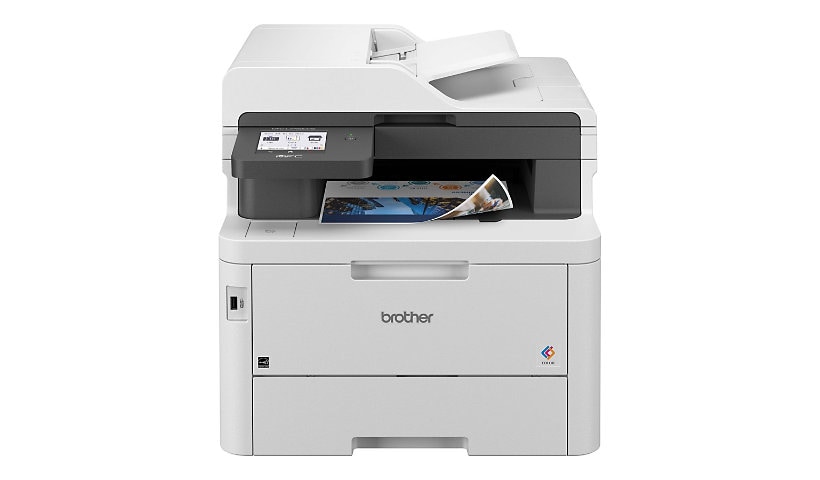
Brother MFC-L3780CDW
Best for colour documents, busy desks
$480–570
See the reviewEpson EcoTank ET-4850
Best for cheap colour pages
$400–500
See the review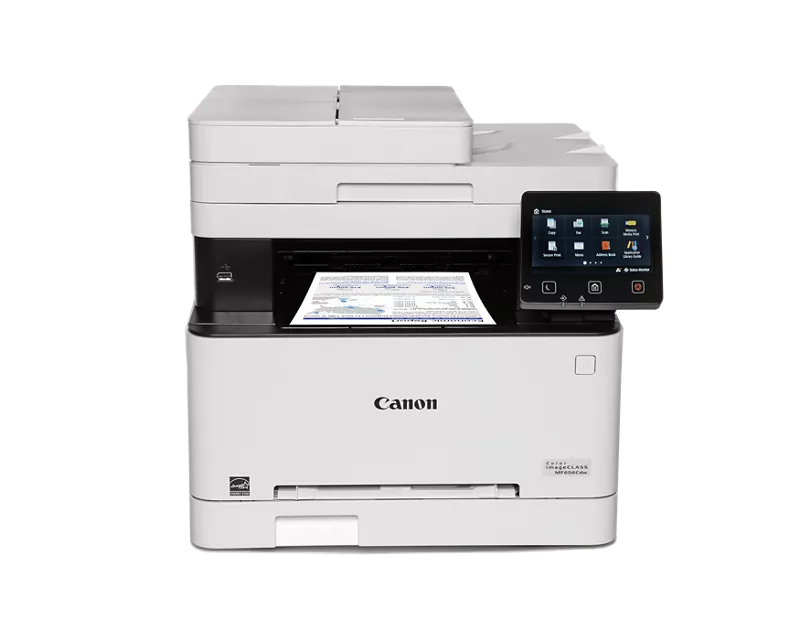
Canon imageCLASS MF656Cdw
Best for heavy scanning
$400–500
See the review
Pantum M6552NW
Best for budget all-in-one
$150–200
See the reviewQuick picks
| Printer | Best for | Price band | Why it made the list |
|---|---|---|---|
| Brother DCP-L2640DW | Most home offices | $200–220 | The default thread recommendation; Wirecutter’s 2026 top pick |
| Brother HL-L2405W | Tight budgets, print only | Under $150 | The cheap Brother laser owners keep for years |
| Brother MFC-L3780CDW | Colour documents, busy desks | $480–570 | Fast colour all-in-one, single-pass two-sided scanning |
| Epson EcoTank ET-4850 | Cheap colour pages | $400–500 | Bottled ink near 0.3 cents per black page |
| Canon imageCLASS MF656Cdw | Heavy scanning | $400–500 | One-pass duplex feeder, 3-year warranty |
| Pantum M6552NW | Budget all-in-one | $150–200 | Print, scan and copy at a print-only price |
Laser, inkjet or ink tank: which should you buy?
For documents, laser wins in most threads we read. Toner is dry powder: it cannot dry out or clog when the printer sits idle, and a high-yield cartridge spreads its cost over thousands of pages. Ink tank printers are the exception to the inkjet rule, refilling from bottles at a per-page cost below laser, provided you print regularly. Cartridge inkjets are the one category we would steer home offices away from: cheap to buy, expensive to feed.
1. Brother DCP-L2640DW: best for most home offices

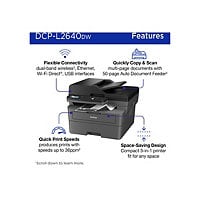
Ask a printer community what to buy and the answer has this shape: a Brother monochrome laser all-in-one. The DCP-L2640DW is the current version. It prints, scans and copies, feeds 50 sheets through its document feeder, and prints two-sided automatically. Amazon showed 1K+ bought in the past week in October 2026, and 1ink’s October 2026 guide notes it is Wirecutter’s 2026 top pick for home use.
Running cost is why it leads. The high-yield TN830XL cartridge (3,000 pages) was $98.29 at Staples in October 2026, about 3.3 cents a page for genuine toner, and less with compatibles, which Brother’s firmware does not block. The catches: a starter cartridge rated at only 700 pages, and a feeder that scans one side at a time.
Key facts
- Price band: $200–220 ($209.99 at Best Buy and Staples, October 2026)
- Running cost: TN830XL toner, 3,000 pages, about 3.3 cents per page
- Paper and feeder: 250-sheet tray, 50-sheet feeder (single-sided scanning)
- Recommended volume: up to 2,500 pages a month, per Brother figures in October 2026 spec roundups
- Warranty: 1-year limited, per Brother
Pros
- The most repeated recommendation in the communities we read
- Cheap genuine toner, and compatibles are not blocked
- Toner cannot dry out between jobs
Cons
- Monochrome only, so no colour documents or photos
- Feeder scans one side at a time
- Starter toner runs out quickly at 700 rated pages
2. Brother HL-L2405W: best budget pick, print only
The HL-L2405W is the same advice with everything optional removed: it only prints, in black and white, over Wi-Fi or USB. For labels, forms and the odd contract, that is enough. PCWorld’s July 2026 piece on a $140 Brother its writer had used for years called it probably the best option for most people.
It uses the same TN830XL toner, so running costs stay near 3 cents a page, and Amazon listing data ranked it #2 in Laser Computer Printers. The compromises are plain: no scanner or copier at all, and two-sided printing is manual. Staples listed it at $139.99 in October 2026, the cheapest way into laser printing here.
Key facts
- Price band: under $150 ($139.99 at Staples, October 2026)
- Running cost: TN830XL toner, 3,000 pages, roughly 3 cents per page class
- Paper: 250-sheet tray
- Size: compact, about 15 lbs, per Amazon listing data
- Duplex: manual two-sided printing only
Pros
- Cheapest entry into laser running costs here
- Compact and light for small desks
- Same cheap toner family as the bigger Brothers
Cons
- No scan or copy function at all
- No automatic two-sided printing
- No Ethernet port (Wi-Fi and USB only)
3. Brother MFC-L3780CDW: best colour laser for busy desks
For colour every day, proposals, worksheets, marketing pages, this is the step up the Brother ladder that threads point to. The MFC-L3780CDW is a colour laser class (LED) all-in-one at up to 31 ppm in colour and black, and its feeder scans both sides of a page in one pass, removing the main annoyance of the cheaper mono models.
Running costs need honest framing. TN229XL yields are strong (3,000 pages black, 2,300 per colour), but a genuine high-yield set costs several hundred dollars, near $419 in one October 2026 comparison, so many owners will run compatibles. Black pages stay in the few-cents class; colour costs more. It is also about 48 lbs. Best Buy listed $479.99 in October 2026 and Staples $569.99, hence the wide band.
Key facts
- Price band: $480–570 (Best Buy and Staples, October 2026)
- Scanning: 50-sheet feeder, single-pass two-sided, up to 29/22 ipm per Best Buy’s spec listing
- Running cost: TN229XL toner, 3,000 pages black, 2,300 per colour; genuine sets pricey, compatibles far cheaper
- Size: about 48 lbs, per retailer product details
- Warranty: 1-year limited, per retailer product details (US Amazon listing ASIN B0CFCW8PGV, confirmed in Amazon’s product details for this model)
Pros
- Fast colour and mono at 31 ppm
- Single-pass two-sided scanning saves real time
- Same no-blocked-toner policy as the mono Brothers
Cons
- Genuine colour toner sets cost several hundred dollars
- Big and heavy for a home desk
- The priciest printer here at most retailers
4. Epson EcoTank ET-4850: cheapest colour pages
The EcoTank line exists to answer the cartridge-price complaint: refillable tanks instead of cartridges. Epson’s 502 black bottle is rated at 7,500 pages and was $24.99 at Staples in October 2026, about a third of a cent per black page; colour bottles are rated at 6,000 pages each, and a full set comes in the box. Nothing else here runs colour that cheaply.
The trade-offs are speed and habits. At 15.5 ppm black and 8.5 colour (ISO, per Epson) it is the slowest printer here, Consumer Reports rated its scanning below par, and like any inkjet it can clog if left unused. Print weekly or better and the maths is hard to beat. Epson rates it for up to 800 recommended pages a month, with a 30-sheet feeder, a 250-sheet tray, Ethernet and Wi-Fi.
Key facts
- Price band: $400–500 (list price $499.99; Consumer Reports listed $498.87 at its 2026 update)
- Running cost: 502 bottles, black 7,500 pages at $24.99 (Staples), about 0.3 cents per black page; colours 6,000 pages
- Paper and feeder: 250-sheet tray, 30-sheet feeder, automatic two-sided printing
- Recommended volume: up to 800 pages a month, per Epson
- Warranty: 1-year limited, per Epson’s specification sheet
Pros
- Lowest cost per page here by a wide margin
- Colour without laser toner prices
- Full set of ink bottles included in the box
Cons
- Slowest print speeds here
- Print heads can clog if the printer sits unused
- High upfront price for an inkjet
5. Canon imageCLASS MF656Cdw: best for heavy scanning and documents
Some home offices are really scanning stations: tax folders, signed contracts, a paper archive going digital. The MF656Cdw is built for that desk. Its 50-sheet feeder scans both sides of a page in one pass, the touchscreen is a large 5-inch panel, and Canon backs it with a 3-year limited warranty, triple the usual cover. It prints at up to 22 ppm in colour and black, and Canon rates it for 150 to 2,500 pages a month.
Running costs are laser class, not EcoTank class. The standard Cartridge 067 black is rated at 1,350 pages, with a high-yield 067 H option for heavier use (rated 3,130 pages in black and 2,350 per colour; Canon’s US store listed the 067 H black cartridge at $126.99 in October 2026). It is another roughly 48 lb machine, and Canon’s US store showed it out of stock in October 2026 while price trackers listed $499.99, so check availability across retailers.
Key facts
- Price band: $400–500 (US price trackers listed $499.99, October 2026)
- Scanning: 50-sheet feeder, one-pass two-sided scanning; 5-inch colour touchscreen
- Running cost: Cartridge 067 toner, standard black rated 1,350 pages; high-yield 067 H rated 3,130 pages black, 2,350 per colour
- Recommended volume: 150 to 2,500 pages a month, per Canon
- Warranty: 3-year limited, per Canon
Pros
- One-pass two-sided scanning for serious paperwork
- 3-year warranty, the longest cover here
- Colour laser output for client-facing documents
Cons
- Slower printing than the Brother colour laser
- Stock was patchy at Canon’s US store in October 2026
- Toner costs more per page than bottled ink
6. Pantum M6552NW: the budget all-in-one most lists skip
Pantum almost never appears on the big sites’ printer lists, which is exactly why it is here. The M6552NW gives you print, scan and copy in a monochrome laser, over Wi-Fi, Ethernet or USB, in a band the big brands reserve for print-only models. For a spare-room office or student desk that scans twice a month, that combination is hard to find under $200.
Expectations should match the price. Print speed is up to 23 ppm, and the PB-211 toner is rated at 1,600 pages (ISO), a mid-pack yield, so per-page costs land in the laser class without beating Brother’s high-yield maths. One caution: genuine PB-211 cartridge pricing in the US is hard to pin down, so check it before you buy. The other compromise is the support network: a smaller brand means thinner help and parts cover. The trade is an all-in-one at a print-only price.
Key facts
- Price band: $150–200 (street prices vary; the model listed at $169.99 in the US)
- Print speed: up to 23 ppm, per Pantum figures in October 2026 spec roundups
- Running cost: PB-211 toner rated at 1,600 pages (ISO/IEC 19752), per Pantum cartridge documentation
- Functions: print, scan, copy; 35-sheet document feeder and manual two-sided printing, per Pantum’s manual
- Connectivity: Wi-Fi, Ethernet, USB
Pros
- Print, scan and copy at a print-only price band
- Laser running costs, not cartridge inkjet costs
- Ethernet as well as Wi-Fi at this price
Cons
- Smaller brand, thinner support and parts network
- Mid-pack toner yield of 1,600 pages
- Fewer long-term owner reports to judge reliability by
All 6 printers compared
| Printer | Price band | Print speed | Colour or mono | Duplex | Connectivity |
|---|---|---|---|---|---|
| Brother DCP-L2640DW | $200–220 | 36 ppm | Mono | Automatic print | Wi-Fi, Ethernet, USB |
| Brother HL-L2405W | Under $150 | 30 ppm | Mono | Manual | Wi-Fi, USB |
| Brother MFC-L3780CDW | $480–570 | 31 ppm | Colour | Automatic print, single-pass scan | Wi-Fi, Ethernet, USB |
| Epson EcoTank ET-4850 | $400–500 | 15.5 ppm black, 8.5 colour | Colour | Automatic print | Wi-Fi, Ethernet, USB |
| Canon imageCLASS MF656Cdw | $400–500 | 22 ppm | Colour | Automatic print, one-pass scan | Wi-Fi, Ethernet, USB |
| Pantum M6552NW | $150–200 | 23 ppm | Mono | Manual | Wi-Fi, Ethernet, USB |
What they cost to run
| Printer | Supply | Rated yield | Cost-per-page class |
|---|---|---|---|
| Brother DCP-L2640DW | TN830XL toner | 3,000 pages | About 3.3 cents per page (Staples $98.29, October 2026) |
| Brother HL-L2405W | TN830XL toner | 3,000 pages | Same roughly 3-cent class |
| Brother MFC-L3780CDW | TN229XL toner | 3,000 black, 2,300 per colour | A few cents for black; colour costs more |
| Epson EcoTank ET-4850 | 502 ink bottles | 7,500 black, 6,000 per colour | About 0.3 cents per black page; cheapest here |
| Canon imageCLASS MF656Cdw | Cartridge 067 toner | 1,350 pages black (standard) | Laser class; 067 H (3,130 pages black) lowers it |
| Pantum M6552NW | PB-211 toner | 1,600 pages | Laser class, mid-pack (check genuine cartridge price) |
Yields are manufacturers’ ISO rated figures and prices are October 2026 retailer checks; re-check both on the live listing before relying on them.
How we picked these printers
The method is the same across this site. We read the owner communities first, and printer communities are unusually consistent: laser for documents, Brother for running costs and unblocked cartridges, and no inkjet for a printer that sits idle. That is why three Brother models lead, backed by published evidence like Wirecutter’s 2026 top pick for home use and PCWorld’s long-term budget Brother piece. The remaining slots went to jobs the favourites do not win: bottled-ink colour, one-pass scanning, and a smaller brand’s budget all-in-one that sells steadily on Amazon while roundups ignore it.
Every model was checked against recall results; none of the six appeared in October 2026. A Canon service notice about shutdowns on some LBP120 and MF270 series printers in India is a different model family and does not touch the MF656Cdw. Where a figure could not be confirmed from a manufacturer or retailer source, the article says so instead of guessing.
Complete your home office
A printer earns its desk space next to the seat you spend the day in, so pair this guide with our picks for the best office chairs, chosen with the same method: owner-community evidence first, running costs and honest compromises in plain sight.
FAQs
Laser or ink tank: which is better for a home office?
Laser, for most document printing: toner cannot dry out, speeds are higher, and cost per page lands near 3 cents with high-yield cartridges. An ink tank model like the EcoTank ET-4850 beats it on per-page cost for colour, but only if you print regularly enough to keep the ink flowing.
What is the best printer scanner for a home office?
For everyday scanning, the Brother DCP-L2640DW pairs a 50-sheet feeder with low running costs. For heavy two-sided paperwork, step up to the Canon imageCLASS MF656Cdw or the Brother MFC-L3780CDW, which scan both sides of a page in a single pass.
How much does a home office printer cost to run per page?
On October 2026 pricing, about 3.3 cents a page for a mono Brother laser on genuine high-yield toner, a few cents for black on the colour lasers, and roughly 0.3 cents a page for black on the EcoTank’s bottled ink. Cartridge inkjets are the expensive outliers, which is why none made this list.
Do I actually need a colour printer?
Only if your documents leave the house: client proposals, school projects, marketing copies. If your printing is forms, contracts, labels and tickets, a monochrome laser is faster, cheaper to run and one less thing to maintain, and a print shop can cover the rare colour job.
Why do printer communities always recommend Brother?
Three reasons repeat in thread after thread: toner prices stay reasonable, the printers accept compatible cartridges instead of blocking them, and the machines keep working for years with little attention. It is a running-cost and reliability verdict, not a print-quality one.
How long does toner last if I print rarely?
Toner is a dry powder, so unlike ink it does not dry out, clog or expire on a home office timescale; a cartridge can sit for months between jobs and print cleanly. That is the core reason occasional printers get steered to laser models in almost every advice thread we read.